en

 ACMOfficial Regional
There is more than one app behind the Download button, and that is the first thing to sort out. Android members install an APK, iPhone members trust a developer profile, and anyone who would rather not install a file at all can add the web app to the home screen from the browser.
This page walks through each route, the install steps in order, what the app adds that the browser does not, and the two bonuses that only count when the deposit is made inside the app.
On mobile, open the menu and press Download. On desktop, the same page is in the header, and each option there carries a QR code you can scan with your phone instead of typing anything.
The page has three tabs: sureWin APP, Android and iOS. Start with the first tab: it holds both the Official App and the Hidden App. The Android and iOS tabs hold the platform-specific files, each with its own QR code.
Reach that page through the current official link only. Our addresses rotate, so if you are unsure which one is live, ask Live Chat or press More Official Link in the mobile menu, then bookmark what you get. If you have not opened an account yet, it is simpler to start by registering your account and then sign in on the app with the same username.
| Detail | Value |
|---|---|
| Platforms | Android and iOS |
| App types | Official App, Hidden App, Lite App, Web App |
| Android method | APK download from the Download page, or scan the QR code |
| iOS method | Developer profile trusted under Profiles or Device Management |
| Login options | Username and password, face or fingerprint, Express login |
| First app login bonus | Random MYR 8 to 38 after an app deposit of MYR 100 or more, 2x turnover |
| Happy Hour window | Tuesday and Thursday, 6 PM to 10 PM (GMT+8) |
All four options sign you into the same account. The difference is how they get onto the phone and how they look once they are there.
| Option | Devices | How it installs | Suits |
|---|---|---|---|
| Official App | Android and iOS | Android APK download, or the iOS file and developer profile; QR codes on desktop | The full app, with face or fingerprint access and Express login |
| Hidden App | Listed beside the Official App | Same download route, disguised icon | A discreet icon on the home screen |
| Web App | Android and iOS browsers | Add to Home Screen from the browser; on Android no Play Store is needed | Getting an icon without installing a file |
| Lite App | Listed on the download page | From the same Download page | Anyone who wants a lighter build |
The Hidden App needs a line of explanation, because the name can mislead. It is not a different casino or a different balance. It is the same app wearing a different icon, for people who share a phone or simply do not want a betting logo on the home screen.
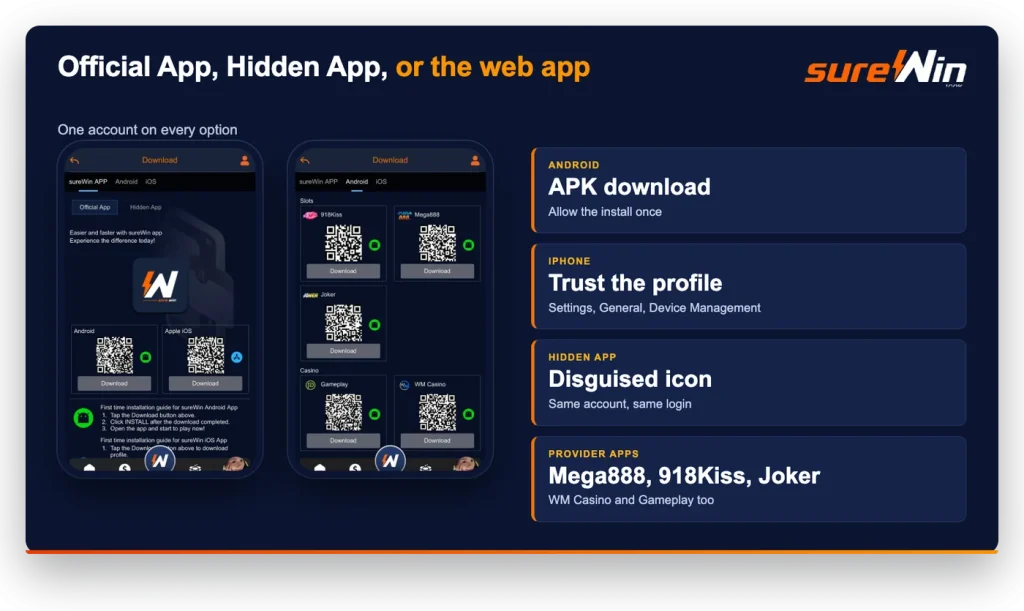
Android treats a file downloaded from a browser differently from a store install, so the phone will ask you to approve it once. That prompt is normal and it only needs answering the first time.
One safety rule covers everything here: take the APK from our own Download page, reached through the official link. There is no store listing, so any third-party site offering a sureWin download APK is not ours, and look-alike pages built to harvest logins are a known trick across this industry. If a file came from anywhere else, delete it and start again from the menu.
The sureWin iOS route needs one extra step that Android does not. After you download the file from the iOS tab, the phone holds the developer profile in quarantine until you approve it.
Open Settings, then General, then Profiles or Device Management depending on your iOS version. Tap the developer profile listed under Enterprise App, then tap Trust. The icon on your home screen will then open normally.
If you would rather skip profiles entirely, use the browser instead: open the site through the official link, press Share, then Add to Home Screen. You get an icon that opens full screen, with nothing installed.
Both routes end in the same place: your account, on your phone, with face or fingerprint access switched on.
Five things sit in the app that a browser tab cannot give you.
Face recognition or fingerprint access locks the account to your phone, which matters more than it sounds if you keep the app on a device other people occasionally hold. Express login keeps you signed in, so the sureWin login app route becomes a single tap instead of a username, a password and a verification check every time.
Beyond access, the app lets you group favourite games so the titles you play most are not buried behind some fifty provider tiles. Referral tracking sits in the same place, so if you are sending friends your link you can see what has come in. Scan to play, on both iOS and Android, opens a game from a QR code.
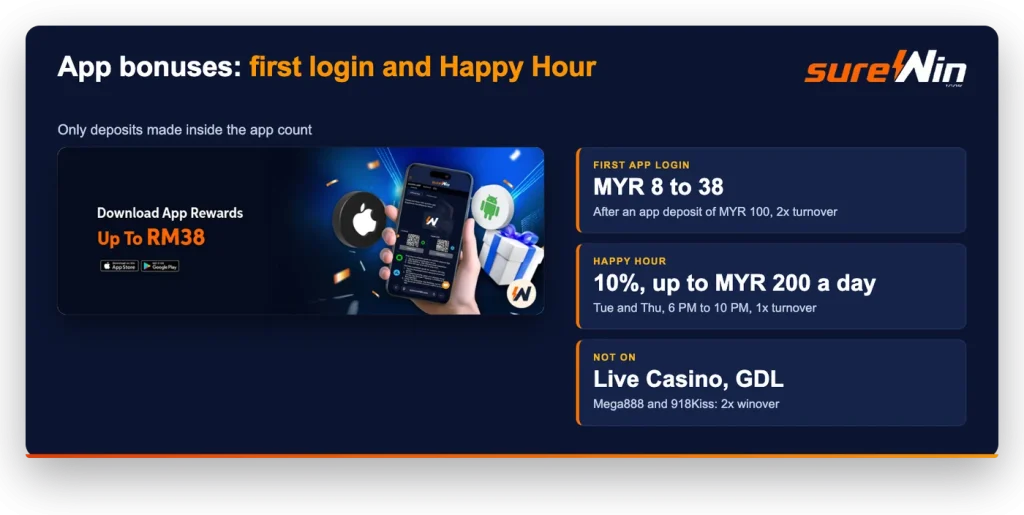
Both of these require the deposit itself to go through the app. A browser deposit on the same account will not trigger either one.
The first is a one-off. Log in through the app for the first time and make an app deposit of at least MYR 100, and a random MYR 8 to 38 is released for you to claim in the Mission Diary. It carries 2x turnover, so a MYR 20 award means MYR 40 of bets.
The second repeats every week. Happy Hour runs on Tuesday and Thursday from 6 PM to 10 PM (GMT+8) and pays 10% on deposits made in the app, up to MYR 200 a day, at 1x turnover. Deposit MYR 100 inside that window and you hold MYR 110 with MYR 110 of turnover to clear. Live Casino and GDL are excluded, and on Mega888 or 918Kiss the condition becomes a 2x winover instead, meaning a minimum balance rather than a bet total. The bonus is valid for one day, so claim it and use it in the same session rather than leaving it sitting. If you want something with a longer runway, our other weekly offers run on a different clock.
Keep in mind
A bonus and the Instant Rebate do not stack. While a promotion is active on a provider wallet, that wallet generates no rebate and takes no second transfer until the turnover is done or the promotion is cancelled.
Scroll further down the Download page and you will find separate installs for Mega888, 918Kiss and Joker on the slots side, plus WM Casino and Gameplay for live casino, each with its own QR codes for iOS and Android. Mega888 and 918Kiss are app-based slots with their own clients, which is why they appear as separate downloads rather than inside the full game lobby.
Credits reach them the same way as anywhere else: move money from the Main Wallet to that provider’s wallet under Fund, then Transfer. Remember that those two carry no Instant Rebate and sit outside most of our bonuses, so check the offer before you fund them.
Four common problems, each with a short fix.
If Android blocks the install, the permission prompt was declined: open your phone settings, allow installs from the browser you downloaded with, and tap the file again. If the iOS icon opens and closes immediately, the developer profile has not been trusted yet, so go back to Profiles or Device Management and finish that step.
If the app loads but will not sign you in, uninstall it and reinstall from the Download page so you are on the current build. And if nothing loads at all, the address rather than the app is the problem: get the current official link from Live Chat, which answers 24 hours a day, and reinstall from there.